
Somewhere in most homes and offices sits a stack of books, old family photos, or paperwork that everyone keeps meaning to digitize and never gets around to. The problem usually isn’t motivation — it’s the tools. A flatbed scanner is painfully slow for anything thicker than a few pages, and snapping photos with your phone leaves you with glare, warped text, and a folder of unsorted images you’ll never actually organize. That gap is exactly where a dedicated book scanner like the CZUR ET Max comes in, promising to turn a tedious, page-by-page slog into something closer to “flip and go.” But at a price tag north of $600, deciding whether this specific scanner is worth it isn’t an impulse call.
This guide breaks down what the CZUR ET Max actually does, how setup and software hold up in practice, and what to weigh before spending $689 on it. It’s written for anyone considering this specific scanner for a serious digitization project — from people preserving an aging book collection to small offices handling paper-heavy workflows. Three things worth knowing upfront: the ET Max is built specifically to solve curved-page distortion on hardcover books, it uses a 38MP CMOS sensor with laser-based correction technology, and its OCR software claims support for over 180 languages, though real-world accuracy varies.
Setup
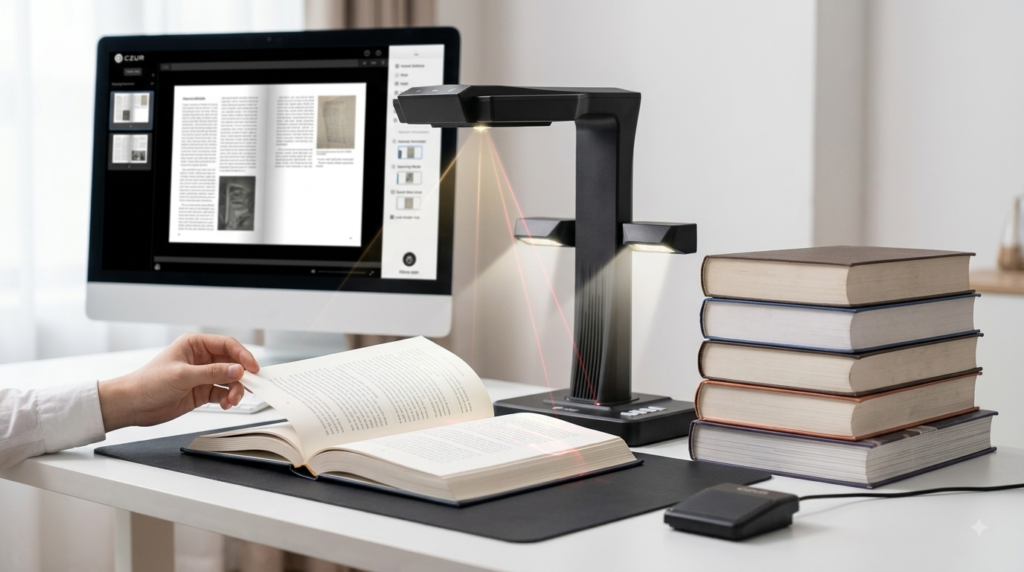
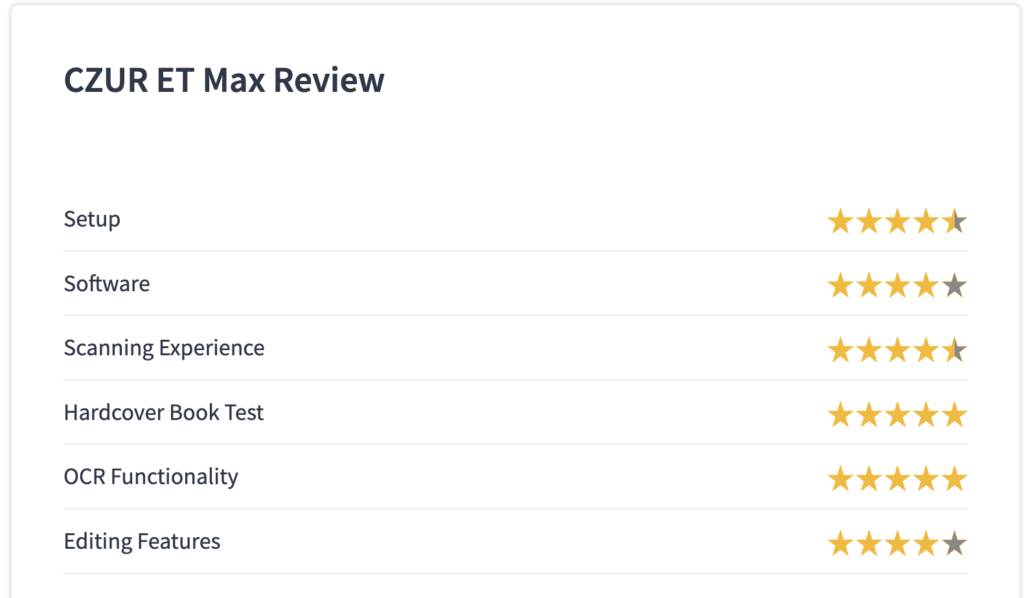
Getting the ET Max running is refreshingly simple. You connect it to a computer, install the CZUR companion app (available for both macOS and Windows), and pair the device by entering the serial number printed on its base. Recognition over USB happens almost instantly, and from there it’s just a matter of opening the app and letting the scanner walk you through the rest.
The box itself comes well-equipped: a physical scan button, a foot pedal, a multi-country power cable, a black scanning mat, side lights for better visibility, and a book page holder are all included. A preview screen sits on top of the unit, showing exactly what’s being captured in real time — genuinely useful when scanning larger books, since it lets you confirm the whole page is inside the frame before committing to a scan.
Software
The CZUR app is where the ET Max’s smarter features actually live. It uses AI to automatically mark the edges of a book or document, preserve the natural colors of illustrations, and correct distortion without manual input. Scans can be exported into JPEG, PDF, or Word formats depending on whether you need a shareable image, a searchable archive, or editable text.
Built-in OCR converts scanned pages into searchable text, with the software claiming support for more than 180 languages. For curved hardcover pages specifically, the app pairs with the scanner’s laser system to measure and correct deformation automatically, though you can also fine-tune the correction manually if the automatic result isn’t quite right. Editing tools inside the app let you adjust contrast and color, crop images, and hide specific sections of a scanned document — useful for basic cleanup without needing separate photo-editing software.
Pros and Cons
Pros
- Fast, largely automated scanning — flip a page, let the scanner capture and process it, and move straight to the next one without manual adjustment
- Strong hardcover book handling — laser-based “Facing Page” correction produces straight, shadow-free scans even on thick, curved books
- Multiple export formats — JPEG, PDF, and Word cover most use cases, from quick sharing to searchable archives to editable text
- Reliable OCR performance — text recognition converts scanned pages into accurate, searchable documents
- Doubles as a document camera — connects to a projector for live display of book pages or documents, useful for teaching or presentations
Cons
- Weak handwriting removal — this editing feature often leaves a visible white overlay instead of cleanly erasing handwritten text
- Occasional color washout — some scanned images, particularly illustrations or photos, can lose a bit of color accuracy
- Premium price point — at $689, it’s a significant investment that’s hard to justify for light or occasional scanning needs
- OCR accuracy varies by language — while over 180 languages are supported, real-world accuracy for non-English text hasn’t been broadly verified
- Software polish has room to grow — the editing suite is functional but noticeably less refined than the scanner’s core hardware performance
Frequently Asked Questions (FAQ)
Q1: Is the CZUR ET Max worth $689? For heavy users digitizing large book collections or handling steady office paper volume, it delivers strong curved-page correction, fast automated scanning, and useful bundled accessories that justify the price. For occasional or light users, a cheaper flatbed or scanning app is likely more cost-effective.
Q2: What’s included in the box with the CZUR ET Max? It ships with a physical scan button, a foot pedal, a multi-country power cable, a black scanning mat, side lights for better visibility, and a book page holder — a fairly complete accessory set for setting up a full scanning workflow right out of the box.
Q3: What are the main limitations to know about before buying? The most commonly reported issues are underwhelming handwriting-removal results, which can leave an awkward white overlay instead of cleanly erasing text, and occasional color washout in scanned images, particularly in printed illustrations or photos within books.
Conclusion
The CZUR ET Max isn’t for everyone, but for the right buyer — someone digitizing a real volume of books or paper documents, especially hardcover material that a flatbed scanner mangles — the $689 price tag reflects genuine, hard-to-replicate value: automated page detection, real distortion correction for curved pages, solid OCR performance, and useful extras like document-camera functionality. Its setup is quick, its software handles the heavy lifting well, and its strengths clearly outweigh its handful of rough edges. The decision ultimately comes down to how much you’re actually scanning and what type of material makes up most of it: casual users with a handful of documents are better served by a flatbed or scanning app, while serious collectors, archivists, and small offices handling steady paper flow will likely get their investment back in saved time and preserved material. Weigh the pros and cons against your own use case, and you’ll have a clear answer on whether the ET Max earns its place in your setup.