 website. 2. Sign in with the Google account tied to your Pixel. 3. Find your eligible Pixel device and select **Opt in**. 4. On your phone, go to **Settings** → **System** → **Software updates**. 5. Tap **Check for update** and install Android 17 Beta 1. A quick heads-up: this is still beta software. You’ll likely run into the occasional bug or bit of instability. It’s perfect for developers and early adopters who don’t mind a few rough edges, but probably not ideal if you rely on your phone as your daily driver just yet. --- ### Wrapping Up Android 17 Beta 1 is more than a routine update—it’s a signal of where Google is heading. From large-screen requirements to smarter memory management and a cleaner Pixel Launcher, it lays the groundwork for a more polished and adaptable Android experience. If you’ve got a compatible Pixel and enjoy being on the cutting edge, this beta is worth a try. Just be sure to back up your data and go in with realistic expectations. The stable release is still a ways off, but this first beta gives us a solid look at what’s ahead.](https://glamgarbs.com/wp-content/uploads/2026/03/Android-17-Beta-1-Launches-After-Delay-New-Changes-How-To-Install-1140x757.jpeg)
After a brief delay, Google has officially rolled out Android 17 Beta 1—and it’s finally in the hands of users. If you’ve been eagerly waiting to see what’s next for the world’s most popular mobile OS, this is your first real taste.
The update went live on February 13, 2026, and while it brings the usual performance polish, the real story lies in what Google is setting up for the future. Think of this beta as more than just a preview of Android 17—it’s a foundation for what’s coming next.
A Bigger Focus on Big Screens
One of the most significant shifts in Android 17 is how seriously Google is now taking large-screen devices. Foldables, tablets, and even desktop-style modes are no longer an afterthought. With this release, developers are being required to properly adapt their apps for resizable windows and orientation changes—no more shortcuts or workarounds.
For users, that means a smoother, more consistent experience across devices. Whether you’re switching from a phone to a foldable or multitasking on a tablet, app layouts should just work without awkward scaling or cut-off content.
A Cleaner Pixel Launcher
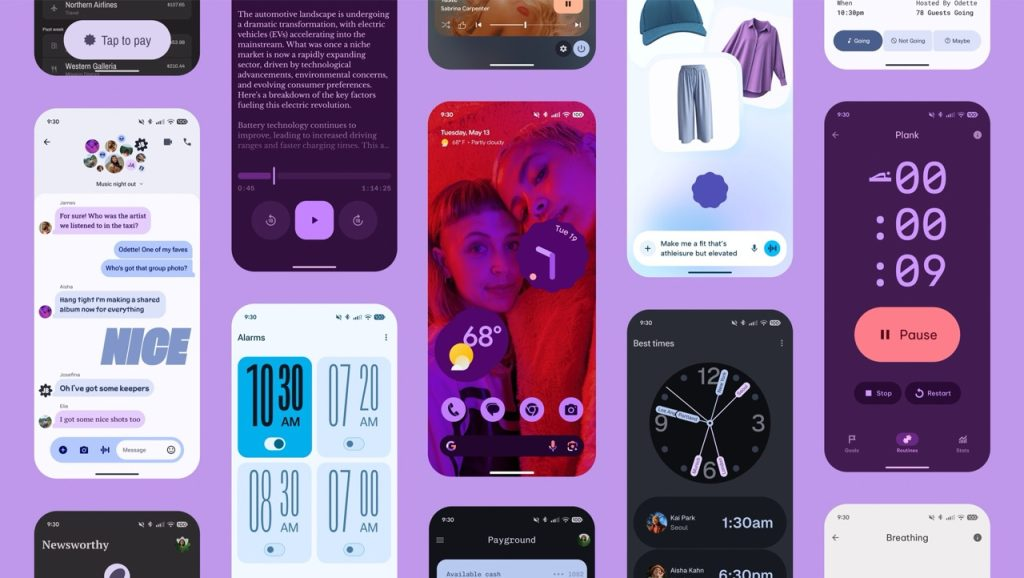
If you’re on a Pixel, you’ll notice a few thoughtful tweaks right away. The home screen search bar is now slimmer and feels more integrated. Google has tucked customizable shortcuts inside it—so you can quickly launch Gemini Live, Translate, or Song Search without cluttering your main screen.
You also finally have the option to remove the “At a Glance” widget if it’s not your style. Smaller touches like a refreshed brightness icon and quicker access to the volume panel round out the visual updates.
Under the Hood: Performance That Matters
Not all improvements are visible—but you’ll likely feel them. Android 17 introduces a generational garbage collection system that reduces CPU load by optimizing how memory is cleaned up in the background. Translation? Smoother multitasking, better battery efficiency, and less lag over time.
App memory management has also been refined, and even notification handling has been optimized to consume fewer resources. These aren’t flashy features, but they’re the kind of background improvements that make a device feel faster and more reliable day after day.
Camera and Media Get a Boost
For anyone who uses their phone to shoot photos or listen to music, there are welcome enhancements here. Camera mode switching is smoother, and overall camera performance feels more stable. Google is also working toward a more unified listening experience across apps and devices—so switching between earbuds, speakers, or apps should feel less fragmented.
How to Install Android 17 Beta 1 on Your Pixel
If you’re ready to jump in, installation is straightforward:
- Head over to the Android Beta Program website.
- Sign in with the Google account tied to your Pixel.
- Find your eligible Pixel device and select Opt in.
- On your phone, go to Settings → System → Software updates.
- Tap Check for update and install Android 17 Beta 1.
A quick heads-up: this is still beta software. You’ll likely run into the occasional bug or bit of instability. It’s perfect for developers and early adopters who don’t mind a few rough edges, but probably not ideal if you rely on your phone as your daily driver just yet.
Wrapping Up
Android 17 Beta 1 is more than a routine update—it’s a signal of where Google is heading. From large-screen requirements to smarter memory management and a cleaner Pixel Launcher, it lays the groundwork for a more polished and adaptable Android experience.
If you’ve got a compatible Pixel and enjoy being on the cutting edge, this beta is worth a try. Just be sure to back up your data and go in with realistic expectations. The stable release is still a ways off, but this first beta gives us a solid look at what’s ahead.