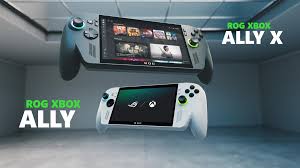
I Daily Drove the Asus ROG Xbox Ally for a Month — Here’s What Won Me Over
Let’s be honest—if you live in India, the world of gaming handhelds has felt more like a waiting game than an actual game. We don’t get the same variety the West or China does. So when I got my hands on a Steam Deck during a trip abroad, it was exciting—and then immediately frustrating, because I knew I couldn’t just go buy one back home.
That’s exactly why the rumors of an Asus and Xbox collaboration grabbed my attention. Asus actually brings its products to India. And sure enough, they recently launched the Xbox Ally here at ₹69,990. For that price, you’re looking at a custom Ryzen Z2 A processor, 16GB LPDDR5 RAM, and 512GB of storage.
I’ve seen takes from US reviewers saying the price feels high for an Xbox-branded device. But here’s the reality: if you live outside North America—which plenty of us do—consoles just aren’t cheap. They cost more, full stop. And when you compare it to other Windows handhelds that ask for the same or even more money, the regular Xbox Ally starts to look like a genuinely solid option. Add a custom Xbox software layer on top, and the value becomes even clearer.
But is it actually worth your money? I reached out to Asus, got the Ally in for review, and used it as my daily gaming machine while traveling across the country for work. Here’s what I found after a month of real-world use.
Design & Hardware
I haven’t used a ton of handhelds, but I know what feels right. And honestly, Asus and Xbox nailed it with the Ally.
It’s made of plastic, but it doesn’t feel cheap. There’s zero chassis flex, and after carrying it around in my backpack for weeks—no case, just loose—it still looks and feels solid. The white finish (only available on the regular model) gets noticed. I had strangers at airports and cafes asking about it constantly. My only real gripe? It picks up dirt and crumbs like crazy. Keep a cloth handy.
A lot of handhelds go for thin and small and end up feeling awkward to hold. The Ally does the opposite. The grips are so well designed that it’s easily the most comfortable handheld I’ve used. Yes, it’s heavier than the Steam Deck at 670g, but everything lands exactly where your fingers expect it to. No weird stretching or finger gymnastics required.
On top, you’ll find two USB-C ports (both support charging), an SD card reader, a headphone jack, volume controls, and a power button that doubles as a fingerprint scanner. The pricier Ally X swaps in USB 4 ports, but for most people, what’s here is more than enough.
Controls & Haptics
Controls can make or break a handheld. If the inputs feel off, the whole experience falls apart.
The Ally avoids that entirely. It’s basically an Xbox controller split in half and attached to a screen. You get two thumbsticks, ABXY buttons, a D-Pad, shoulder triggers, and a couple of extra buttons on the back. It all feels familiar in the best way.
The thumbsticks aren’t Hall Effect, but they’re snappy and have held up fine through my travels. The D-Pad is clicky and responsive, the ABXY buttons give solid tactile feedback, and the shoulder triggers are Hall Effect—accurate and satisfying to use.
The rear paddles are customizable through the Armoury Crate app, and you can remap regular buttons too. Haptics add rumble that syncs with games. It’s not PS5-level, but it does the job. What genuinely surprised me were the speakers. They’ve got real bass and make a noticeable difference for both games and media.
Display
Asus stuck with the same 7-inch Full HD IPS panel from the previous Ally—and honestly, that’s not a bad thing.
It supports a variable refresh rate up to 120Hz, which makes a real difference in gameplay. I would’ve loved OLED, but the glossy IPS panel still looks good. I measured 96% sRGB coverage and about 74% DCI-P3. You’re not editing video on this, so the color accuracy is more than fine.
The glossy finish does mean fingerprints show up easily. You will get used to carrying a microfiber cloth.
One small hiccup: out of the box, the screen felt dim in bright environments. Turns out Windows had a battery-saving brightness limiter on by default. Once I disabled that, it was a different story. I measured peak brightness over 450 nits—bright enough to use comfortably just about anywhere. And thanks to VRR, I didn’t run into screen tearing issues.
Software & Performance
When Asus announced this Xbox collaboration, my first question was: how do you keep Windows from getting in the way?
The answer is the Xbox Full Screen Experience. It’s the centerpiece of the Ally, and honestly, I love it. When you turn the device on, it boots straight into the Xbox launcher. You don’t see Windows unless you want to. Since Windows is a resource-heavy OS, that launcher also helps keep background activity in check.
You can switch to Windows mode with one button press, but if you never do, you’ll never see the desktop. That alone sets the Ally apart from every other Windows handheld.
Pressing the Xbox button pulls up a clean menu showing all your games—even ones from third-party launchers—plus settings for sound, brightness, Xbox Social, and Gaming Copilot. There’s also an Armoury Crate section where you tweak performance modes, enable overlays, change resolution, set frame limits, and more. Everything feels intentional.
But Windows Is Still Windows
It’s not all perfect. Sometimes games don’t recognize the controller and show keyboard prompts instead. Pressing the Xbox button usually fixed it, but it’s not something you’d instinctively try if you’re new to PC gaming. I also had a weird issue where EA games didn’t show up in Game Pass for about a week—even though they should’ve been included. The EA Play app eventually caught up, but it was frustrating in the moment.
If you open the Windows desktop and then jump back into the Xbox launcher, you’ll need to restart the device to get full performance again. Otherwise, Windows keeps running in the background and eats into resources.
Still, Windows has upsides. It opens up a massive library of games—including emulation—and turns the Ally into a full PC when you connect it to a monitor. I ran some benchmarks too. The Ally scored 1,171 in Geekbench single-core and 4,398 in multi-core, putting it right alongside the Steam Deck OLED.
How Does It Game?
This is the part that actually matters.
The Ally runs on a Ryzen Z2 A processor with integrated RDNA 2 graphics. Performance really depends on what you’re playing.
For demanding games like Cyberpunk 2077 and Starfield, you’ll want to run at 720p with low to medium settings. I got around 40 fps in Cyberpunk, and Starfield stayed above 30 fps. AMD’s FSR 2.1 gave a noticeable bump in frame rates, though frame generation isn’t for everyone.
But where the Ally shines is in more sensible titles. In GTA 5 Enhanced Edition with medium to high settings, I was hitting well over 40 fps—sometimes 60—even during online play. Forza Motorsport, Shadow of the Tomb Raider, F1 2024, and Injustice all landed comfortably in the 40–45 fps range on medium settings. You can push for 60 if you lower visuals, but I personally prefer the extra detail. Lighter games like Real Cricket and Rematch ran at 60 fps without breaking a sweat.
And since it’s an Xbox device, you can stream games through Game Pass Ultimate. I tested GTA Online both installed and streamed. With a solid connection, streaming was perfectly fine for story games—just don’t expect it to replace local play for fast-paced shooters.
Battery Life
Battery is one of the biggest differences between the standard Ally and the Ally X. The regular model packs a 60Wh battery; the X bumps that up to 80Wh.
In real use, running GTA V Online at max brightness with Turbo performance mode, I got about two and a half hours from full charge. Dialing back brightness and performance helped push that past three hours.
Charging is handled by a 65W fast charger that takes just over an hour to go from 0% to 100%.
Verdict
At ₹69,990, the ROG Xbox Ally isn’t for everyone. It’s a niche device, built for people who are constantly on the move but still want to play the games they actually care about.
For me—traveling frequently as a tech journalist—it was a lifesaver. Long airport waits turned into actual gaming time. The performance is genuinely solid, the 120Hz display is vibrant and smooth, the ergonomics are the best I’ve used, and the Xbox Full Screen Experience finally makes a Windows handheld feel like a real console. And when you need it to, it’s still a full Windows PC for work or emulation.
If you’re someone who lives in airports, cafes, or anywhere between home and where you need to be, the Xbox Ally delivers exactly what it promises—without making you wrestle with Windows every step of the way.